Change Data Logger update interval
Written By Pigge Apps
Last updated 22 days ago
If you want your data logger to update more frequently, you can change Update interval.
Login to https://server.growatt.com, go to bottom of the page, click on “All Devices →” Pic 1

Select Data Logger at top left then click on “Datalogger Setting“ Pic 2

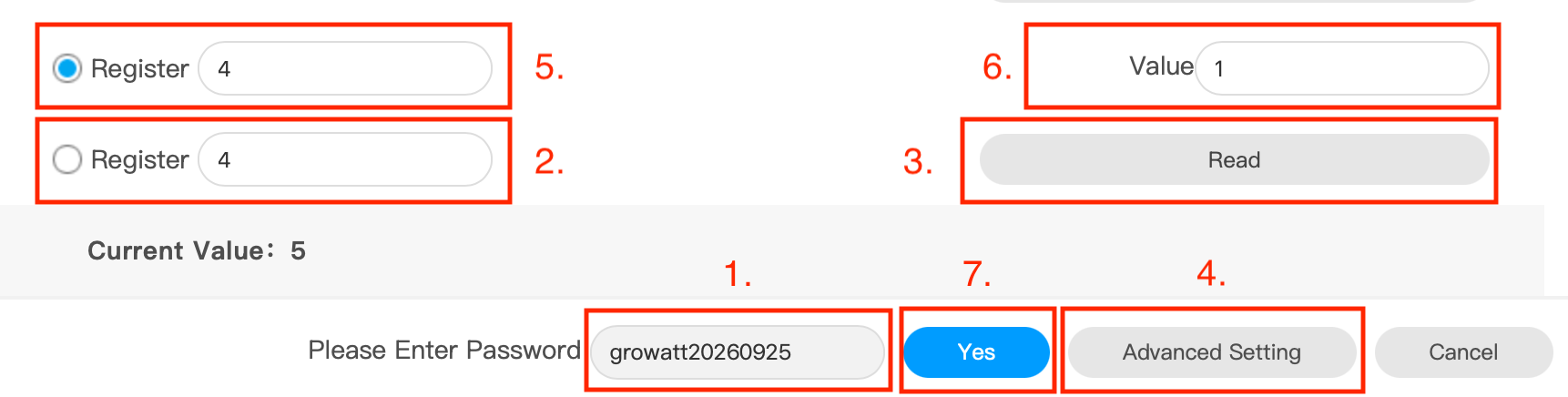
password is “growatt” + todays date yyyymmdd, yearmonthday.
type “4”
click read and click Yes in the popup message, “Current Value: x” will show how often your data logger is updating, in minutes
Click on Advanced Setting
type “4”
type how often your want your system shall update, in minutes. DO NOT GO BELOW 1 MINUTE AND USE WHOLE NUMBERS ONLY (E.G. 1, 2, 3, 4). NO DECIMAL NUMBERS
click Yes to update your changes. Click on Read(3.) and then Yes in the popup message. Now “Current Value:” should show the new value
Was this helpful?
Still need help? Share an idea